Signing up on Skidmore Domains

Reviewing the Guidelines

Before you get started, we recommend that you review our information about Choosing a Domain Name.

The Sign-Up Process (2 Options)

Once you’ve reviewed the guidelines, you can proceed to the sign-up page.

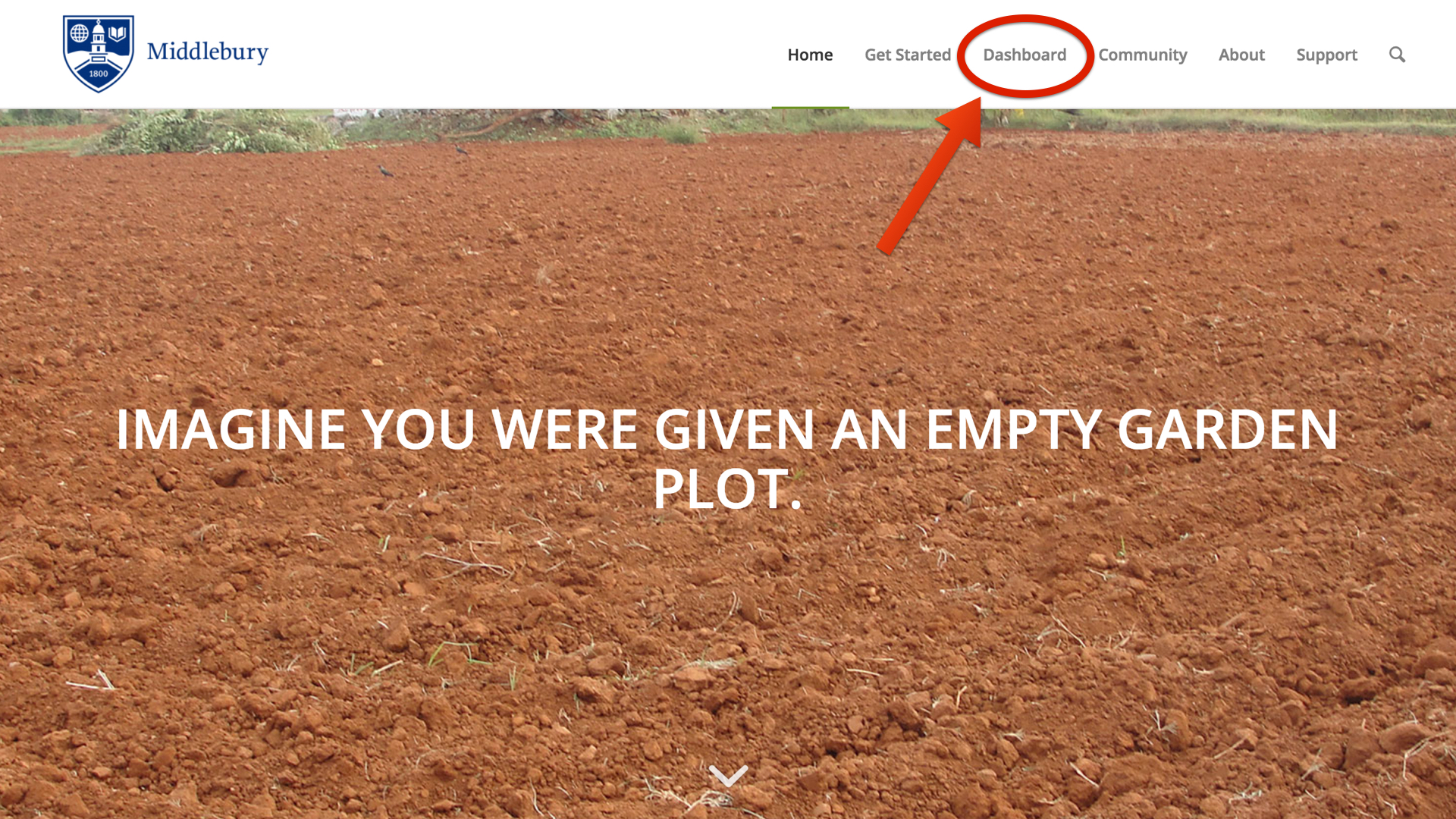
Click on the right hand side where it says Dashboard.


dashboard.001

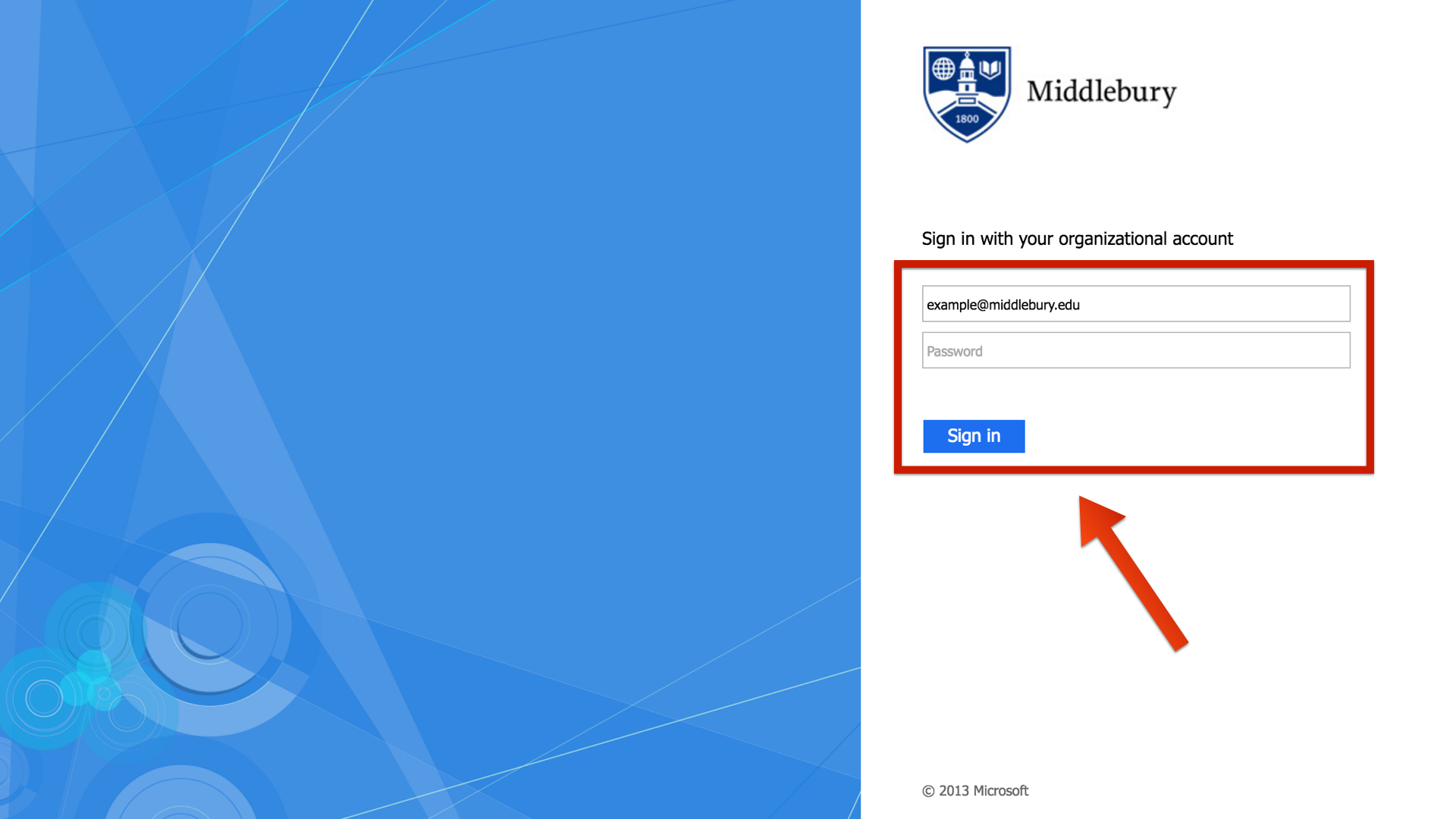
You will be redirected to login for verification. You will use your Skidmore username and password to login.

sign in.001

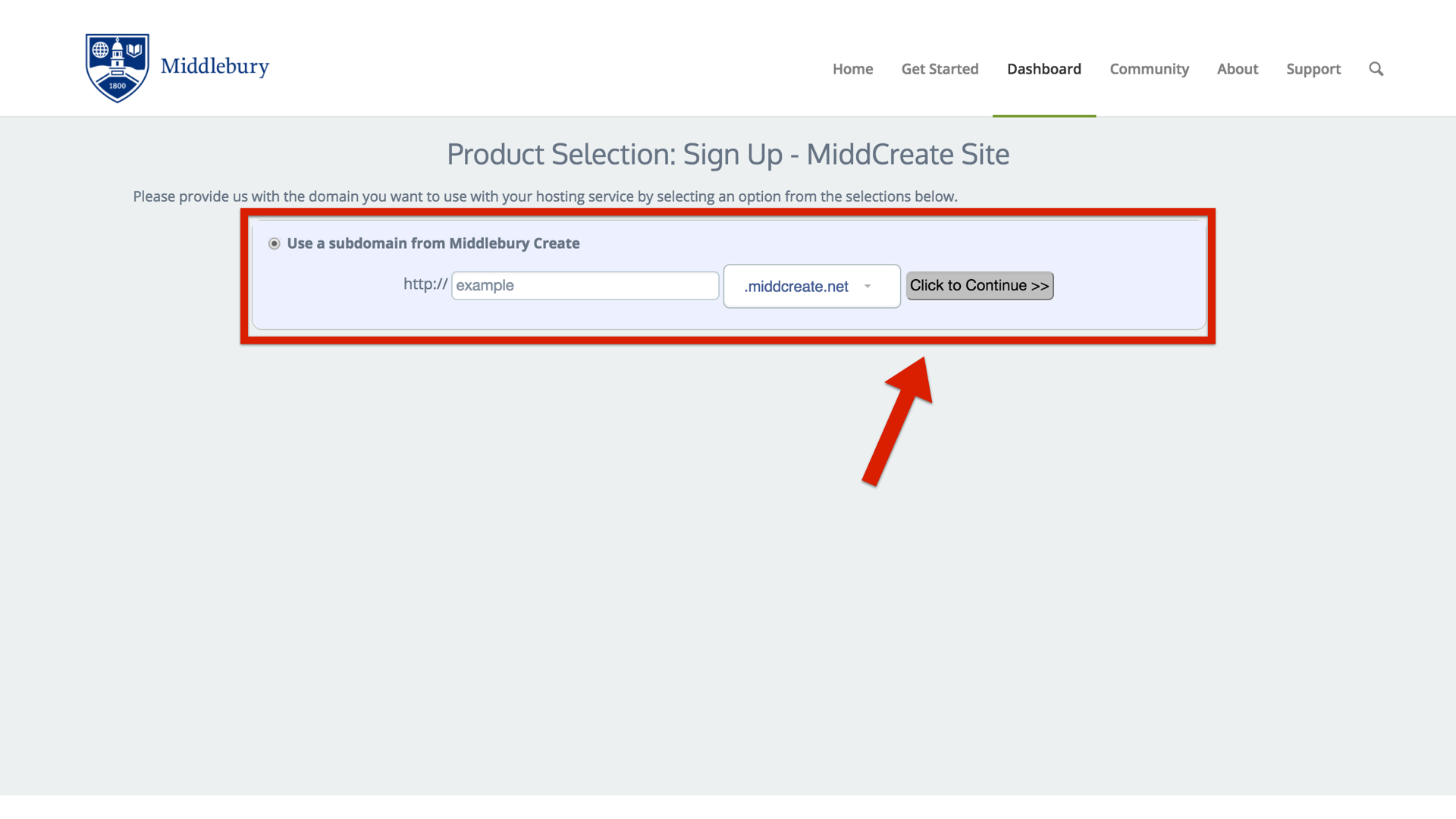
Option 1: Free Subdomain

If you wish to create a free subdomain of domains.skidmore.edu, leave this default option selected and enter in the subdomain you want for your Skidmore Domains website. When you’ve found an available subdomain, click the button labeled Click to Continue.


You will be brought to the sign up page. Since you selected the subdomain option, you should see that it is available for free.

sign up.001

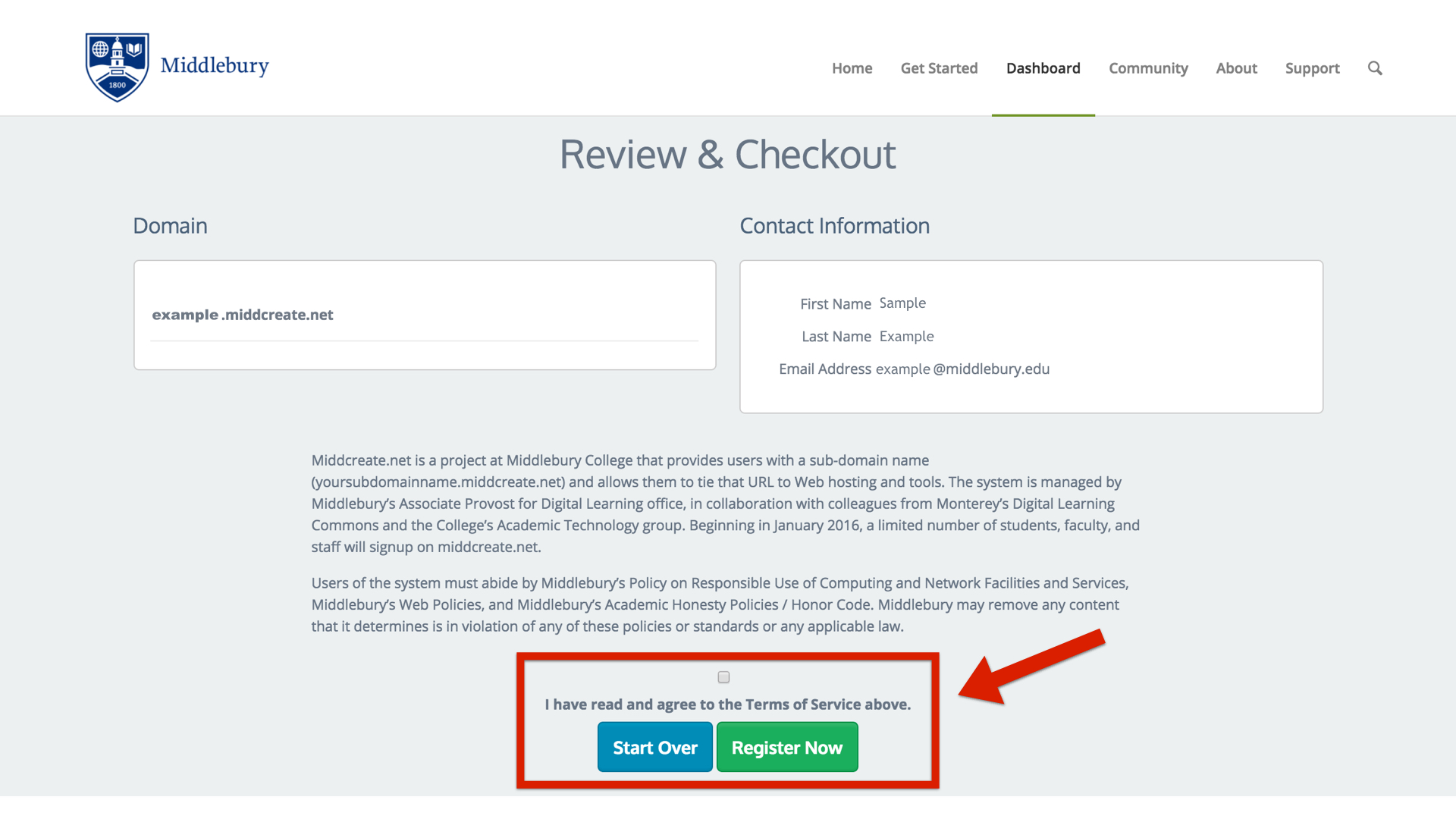
Read the Terms of Service. To continue, you will need to check the box to agree to the Terms of Service and select Register Now.

register now.001

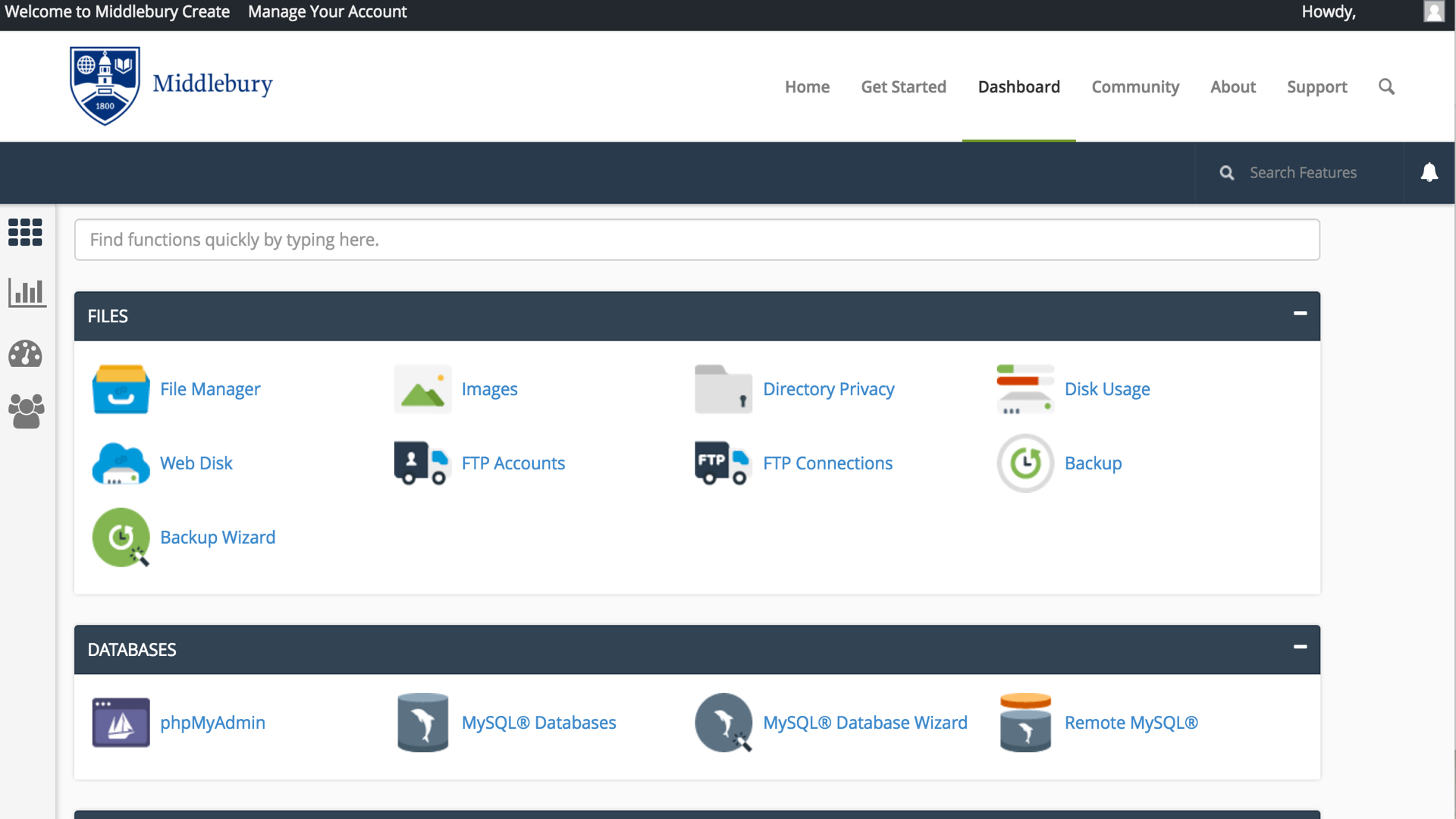
After you click “Register Now”, you will be brought to the cPanel and are on your way to creating your own Skidmore Domains space.

cpanel.001


Choosing your domain name

Choosing your domain name is the first step in getting started with staking your claim on the web. Your domain name is really just a unique Web address that can be used to build out your own digital presence. As you make your choice, there are a few considerations to keep in mind:

Your Domain Name Must Be Available: Domain names must be unique, which means in order for you to claim your own, you need to be sure that it is currently available (and not being used by any one else or any company or organization). There are lots of tools to check on domain availability, and when you sign up on domains.skidmore.edu, we’ll actually check the availability of your choice for you. If you’d like to spend some time thinking about your choice and checking availability before you actually sign-up, we recommend using whois.net.

You Must Choose a “Top Level Domain” or TLD: The TLD is the suffix (or ending part) of your domain name. On domains.skidmore.edu, we only allow you to choose from 5 TLDs: .com, .net, .org., .info. and .us. You must choose which one you want to use (and the availability of your domain may depend upon the TLD you choose). Historically, .com domains were meant for businesses and commercial entities. On the other hand, .org domains were usually used by non-profit organizations. The .net domain was mean to be used by internet service providers. All of that said, the “historic” uses of these TLDs means very little anymore. You may find that .com domains are easier for people to remember, or you may like the “non-commercial” message of using a .org. The bottom line is that your choice of a TLD is entirely personal: just make sure that you choose one of the TLDs allowed by domains.skidmore.edu.

Choose a Domain You Can Live With: You should choose a domain name that you feel you can live with for quite some time. You should pick something that you won’t find embarrassing in the future. A good rule of thumb is to pick a domain that you would be comfortable putting on a future job application.

You May Wish to Include Your Name in Your Domain: There is no requirement that your domain reflect your specific identity in the form of your first and last name. However, choosing a domain name that includes your name may make it easier for you to achieve higher rankings in search engines when someone queries your real name.

Pick a Domain you Like: At the end of the day, your domain should reflect you. Pick a domain you like and are proud of. It can reflect your interests, sports you play, or your hobby. Or it could just be your name. The “right” domain for you is the one you’re comfortable with.
Registering a Domain

Skidmore Domains currently utilizes subdomains of .domains.skidmore.edu for the initial signup, however after using your space you may decide you’d like to register a top-level domain (a .com, .net, .org address). You can do this by registering a domain with a service provider (we make a recommendation below, but any domain provider should work) and adding it to your space as an Addon Domain.

To start you’ll need to get the domain registered. When choosing a domain we recommend keeping it all lower-case, avoiding hyphens, keeping it short, and of course it will need to be a unique address. Our service provider, Reclaim Hosting, has made the process of registering a domain quite simple, and the domain will work with very few additional steps due to the integration they have with our hosting system. To register a domain you would go to https://portal.reclaimhosting.com/cart.php?a=add&domain=register and type in the domain you’d like to purchase:

Screen Shot 2015-12-07 at 9.23.30 PM

After ensuring the domain is available for purchase you’ll be prompted to select whether you’d like to protect the contact information associated with the domain. All domain registrations are required to have valid contact information publicly available, however a proxy service to protect your identity is available for an additional fee. You can read more about this service, ID Protect, at http://docs.reclaimhosting.com/FAQ/ID-Protect-FAQ/.

Screen Shot 2015-12-07 at 9.25.46 PM

You’ll also be prompted for nameservers for the domain. If registering the domain through Reclaim Hosting you can leave these with the default. If registering the domain elsewhere you’ll want to point the nameservers to ns1.reclaimhosting.com and ns2.reclaimhosting.com in order for the domain to work with our system.

Once you’ve completed the checkout process with payment information the domain will be registered automatically. The last step is to add it to your existing account here at Skidmore Domains. To do that you’ll log into your account at https://domains.skidmore.edu/dashboard and in cPanel navigate to Domains > Add-on Domains.

addon domains.001

Here you will type in the domain that you registered previously to host it within your space on Skidmore Domains. cPanel will also setup a subdomain which you can leave with the default that it creates and verify a location for the files for the domain (typically a folder inside of public_html). The option to create an additional FTP account is present but not necessary. Once the domain is entered click Add Domain to add the domain to your hosting account.

create an addon domain.001

At this point the domain will now be hosted in your account and you can use it to install software, upload files, and any number of other actions available to you in cPanel.

Social Media

As you begin to build out your digital presence you’ll probably start to think about social media in some form. In fact it’s likely that you already have at least one, if not more, social media accounts (Facebook being the most popular to date). Everyone uses social media in different ways, and although it’s often interesting to see people break the boundaries of the “social norms” of a specific online community, this article will focus more on the accepted use cases for specific social networks and how they can help you build your digital presence. This is by no means a comprehensive “How To” of Twitter or Facebook, but a good starting guide to think about where you best fit in to these online communities.

Facebook

The majority of folks that will read this likely have a Facebook account. With over 1 billion active users it’s by far one of the more popular social networks. Many treat Facebook as a semi-personal space, one reserved for family and friends to share photos and highlights of what’s happening in their lives. Facebook also supports “Groups” for sharing amongst a smaller set of individuals regularly, and “Pages” which are less personal and more public-facing profiles meant for organizations and businesses. There are plenty of applications that make it easy to publish a link to the work you do on your blog and your participation in other networks back into your Facebook profile. In general it’s a good practice and can often lead to interesting conversations with different groups of folks. This practice of publishing elsewhere and then feeding into Facebook is desired over the alternative, using Facebook for all content and then pushing it out to other communities. The main reason for this is that privacy concerns over how different people can view content on Facebook have changed often enough to leave users concerned. There’s also never any certainty of sustainability with any of these social networks (remember MySpace or Friendster?) no matter how popular, so publishing in your own space and then pushing out to others makes a lot of sense. The key takeaway is that Facebook is a great personal network and can also be the starting point for some of these larger professional discussions should you decide to use it that way.

Twitter

While no longer the new kid on the block, Twitter has only relatively recently started to gain momentum. It doesn’t have nearly the same user base as Facebook (though there are about 500 million accounts to date) and the way people use it is very different. Twitter has focused on the short status message from the start, before Facebook even integrated the idea into their platform. Users are limited to 140 characters. It’s a conversational platform for interacting with people. It’s used heavily at conferences and many choose this as a social network for really networking with peers and others in their community as well as people they might not ever meet in real life. You can follow as many people as you want and it’s a great way of having a stream of information about “what’s happening” with people and groups you’re interested in. One powerful development of Twitter is that celebrities have begun to embrace it as a way to speak directly to their fans without having the message interpreted through other media and journalism with a slant. The ability to search various topics or hashtags (keywords) and see a running stream of what people are saying about that topic is also a very powerful way of gauging reaction to ideas and events. It’s a great idea to experiment with a Twitter account by signing up, adding a profile picture and information about yourself, following a group of people, and interacting with it daily. While the gratification may not be immediate, it’s one of those social networks where the more you put into it the more you will get out of it.

LinkedIn

LinkedIn is the professional resumé of social networks. It mixes the ability to keep an updated resume of where you work and what your accomplishments are with a social aspect of having people recommend you and comment on your work. Most users find LinkedIn helpful not as a day-to-day network they use, but rather when they’re searching for a new job and want to find people they know that might have connections. The old saying “It’s who you know” when finding a job or making a connection is particularly relevant here where those connections can be exposed to you (You know this person who works for the company of one of Bill Gate’s sons, and the VP went to high school with you).

Summary

As mentioned in the opening paragraph, talking about social media is an ever-changing and moving target and this article can never be truly comprehensive. The goal of domains.skidmore.edu is to have you thinking more critically about where you put your content, not that you don’t participate in these networks which still have a lot of value, but rather that you own the work you create. Facebook, Twitter, LinkedIn, and others all have different audiences and the more places you push your content to, the more opportunities for discussion and feedback you’ll receive. The ability to network with an increased amount of people that isn’t reliant on face-to-face meetings is a powerful change in how we interact on the web and the value of it. As you begin to explore social media the best recommendation would be to choose a space you want to explore and really dive in. Follow as many people as possible, talk to them, respond to their work, and you’re more likely to get responses in return that start to build that sense of community for you.